Task mode
Opt-in
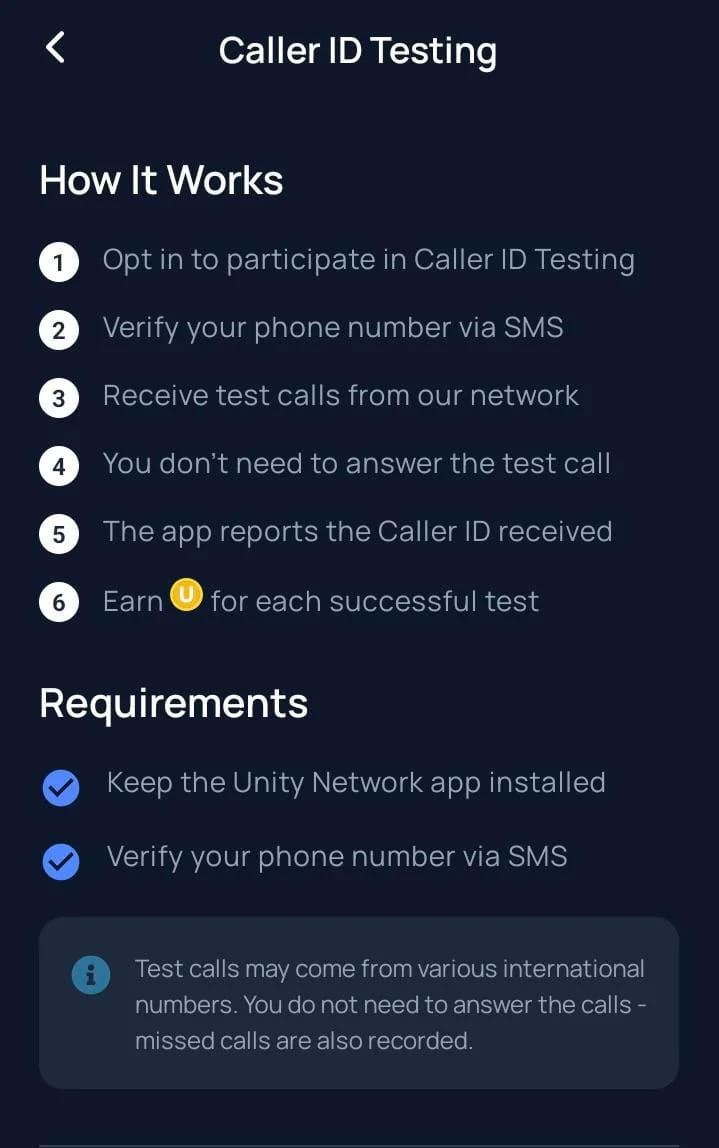
Enable Caller ID Testing from the Tasks area inside the Unetwork app.
Updated June 14, 2026 - Operator task guide
Use your phone to check whether a real test call reaches your number and what caller ID appears. You do not need to answer the call. You have 24 hours to report what you see.
Key point: a missed test call does not automatically mean the task is lost. Open Unetwork and report during the 24-hour window when it is available.
Task mode
Opt-in
Enable Caller ID Testing from the Tasks area inside the Unetwork app.
Answering calls
Not required
Let the test call arrive, then report what your phone shows.
Report window
24 hours
If the app shows a reporting window, submit the call details within 24 hours.
Rewards
0.05-0.2 UP
Typical range per valid call report before the 40 UNO / 60 ULO license split is applied.
What it is
CLI means Calling Line Identification. In Unetwork, Caller ID Testing checks whether a real incoming test call reaches an operator's phone and whether the caller ID shown on the device can be reported accurately.
Because tests run on active SIMs or eSIMs across live carrier networks, they show what is happening at the edge: real countries, carriers, routes, and devices.
Your part
Keep the phone reachable and report what the app asks for.
Your report helps verify caller ID behavior across real devices and carrier paths.
No call handling
You do not need to answer the call.
Letting it ring or missing it can still be reportable when the app shows a 24-hour reporting window.
Operator flow
Turn on Caller ID Testing from Tasks in the Unetwork app on the device you want to use.
Use an active SIM or eSIM with incoming calls enabled, and keep the phone powered on and signed in.
The call can look like a normal incoming call and may come from different domestic or international numbers.
You do not need to answer. Open the app and submit exactly what your phone showed during the reporting window.
Numbers may vary. CLI calls can come from different domestic or international numbers because the task measures route behavior across carriers and regions.
Requirements
Wi-Fi helps the app stay connected, but the test call itself must reach an active mobile number through the carrier network.
Unetwork app installed
Operator action
The app manages opt-in, phone verification, reporting, and reward tracking.
Keep the app installed, updated, and signed in.
Active SIM or eSIM
Operator action
The test call must reach a real mobile number through the carrier network.
Use a working line with incoming calls enabled.
Phone verification
Operator action
The app may verify the number before Caller ID Testing is available.
Complete SMS or number verification when prompted.
Notifications and background access
Operator action
The app needs to alert you and keep task state synchronized.
Allow notifications and background operation where supported.
Reachable phone
Operator action
If the phone is off, out of signal, or blocked by battery settings, the call may not arrive.
Keep the device powered on, online, and reachable.
iOS note
iOS may display some PoW or background connectivity indicators differently because of operating system restrictions. CLI testing remains supported on iPhone.
Everyday phones
A dedicated testing phone is not required. Use whichever device can stay powered, signed in, and reachable through an active mobile number.
Task volume
Operators should not expect identical task volume across all devices or regions. Volume changes by country, carrier, current customer demand, regional coverage needs, active campaigns, and reporting history.
Best practices
CLI rewards depend on available campaigns and approved reports. These habits reduce preventable misses and make the device easier to use when a route needs verification.
When a task seems missed: first check that the app is signed in, the SIM is active, incoming calls are enabled, and background restrictions are not blocking the app. Then look for any 24-hour reporting window inside Unetwork.
Frequently asked questions
No. The task checks whether the call reached your phone and what caller ID appeared. You can report the call without answering it.
Yes. CLI tasks are supported on iOS. iOS may show some background or PoW connectivity states differently, but Caller ID Testing can still run on iPhone.
No. Wi-Fi helps keep the app connected, but the test call must reach an active SIM or eSIM through the mobile network.
Yes. A dedicated testing phone is not required. Some operators still prefer a spare phone because it can stay powered on, reachable, and allowed to run in the background.
Not necessarily. If the app shows a reporting window, open Unetwork and submit what your phone showed within 24 hours.
Task volume can change by country, carrier, customer demand, regional coverage needs, active campaigns, and device reporting history.
Ready to participate
This portal lists licenses where the app-side operator receives 60% of approved rewards. After you claim a code, install Unetwork, sign in, verify your number, and opt in to Caller ID Testing.
Need operator chatter and rollout notes? Join the Telegram community.